Microservices Architecture on Google Kubernetes Engine
Building resilient microservices on GKE with Cloud Load Balancing, Artifact Registry, and managed Google Cloud data services.
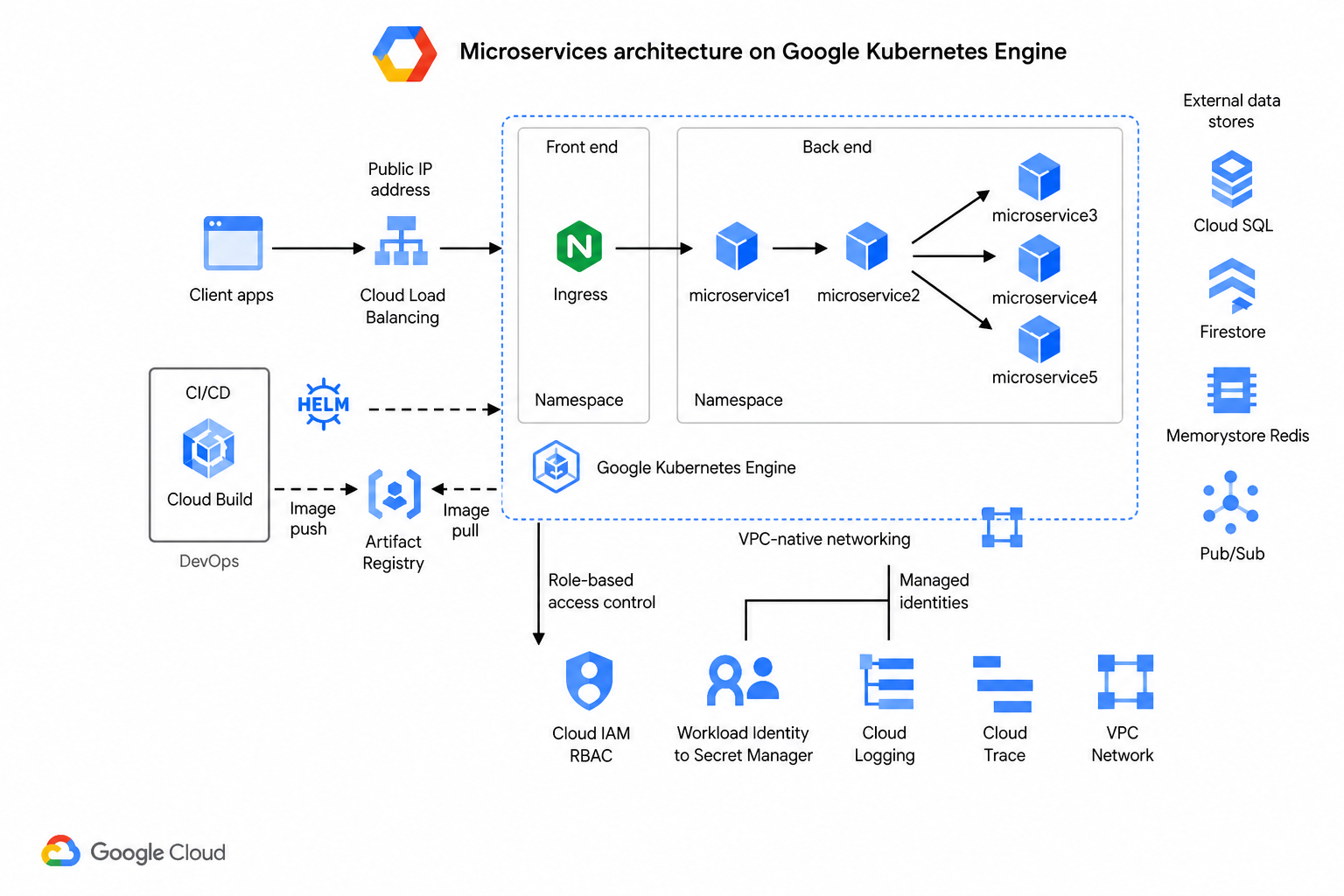
Google Kubernetes Engine was an early managed Kubernetes option, and at VF Interactive we adopted GKE for workloads that benefited from tight integration with BigQuery, Pub/Sub, and Cloud SQL. The diagram above reflects a production-ready GKE layout from 2020 onward.
Traffic flow
Users connect through Cloud Load Balancing with a global anycast IP. Traffic enters an Ingress controller in the frontend namespace, which routes to backend microservices based on URL paths and hostnames.
Microservice layout
Services run in isolated namespaces with microservice1 acting as the edge API, microservice2 handling orchestration, and microservice3 to microservice5 owning data access. VPC-native GKE networking assigns each pod a routable IP from your VPC subnet.
CI/CD and images
Cloud Build triggers on commits to build and scan images. Artifacts land in Artifact Registry. Helm or Config Sync deploys workloads. Workload Identity lets pods authenticate to GCP APIs without static keys.
Data and messaging
External stores include Cloud SQL for relational data, Firestore for document workloads, Memorystore for Redis caching, and Pub/Sub for event-driven communication between services.
Security and operations
Cloud IAM and Workload Identity enforce least-privilege access. Secret Manager stores sensitive configuration. Cloud Monitoring and Cloud Trace deliver metrics, logs, and request tracing.
Implementation Checklist
Enable Workload Identity before deploying applications. Use regional clusters for HA. Configure Network Policies with Calico or Cilium. Set up Cloud Build triggers linked to your repository. Enable GKE cost allocation labels for FinOps visibility.
Production Hardening
Enable Binary Authorization to enforce signed images. Use private GKE clusters with authorized networks. Configure maintenance windows and release channels appropriate to your risk tolerance. Back up etcd state and test cluster recovery.
When to Choose GKE
GKE suits teams leveraging BigQuery, Pub/Sub, and other GCP data services alongside containerized applications. Google operates Kubernetes upstream, so GKE often receives features first. Choose GKE when data analytics and ML pipelines share infrastructure with microservices.
Networking Deep Dive
GKE VPC-native clusters allocate pod IPs from your subnet ranges. Alias IP ranges maximize IP efficiency. Firewall rules and Network Policies layer defense. Private Service Connect reaches Google APIs without public routing. Cloud NAT provides outbound internet for private nodes.
Observability Stack
Cloud Monitoring dashboards track pod CPU, memory, and restart counts. Cloud Logging aggregates container stdout with queryable labels. Cloud Trace links spans across microservices. Error Reporting groups similar stack traces for faster triage.
Common Pitfalls
Adopting tools before defining outcomes leads to expensive experiments without business value. Copying another organization's architecture without understanding your constraints creates fragile systems. Skipping documentation means every new team member relearns lessons the hard way.
Getting Started
Define success metrics before implementation. Start with the smallest scope that proves value. Review results with stakeholders weekly during the first month. Iterate based on evidence, not assumptions.